
Research and community groups that fall within the scope of Sedgwick Reserve’s mission can use the Reserve to host meetings and workshops. Sedgwick Reserve has hosted meetings and workshops for research groups across the sciences and humanities and nonprofits such as the Santa Ynez Valley Natural Historical Society, the Environmental Defense Center, and the Santa Barbara Land Trust.
Please note: Sedgwick Reserve has a managed-use mandate which means that groups cannot go on a hike without Sedgwick staff or a docent guide. Please see here for more information about scheduling a docent-led hike.
Below is information to help you decide if Sedgwick Reserve is right for your meeting or workshop:
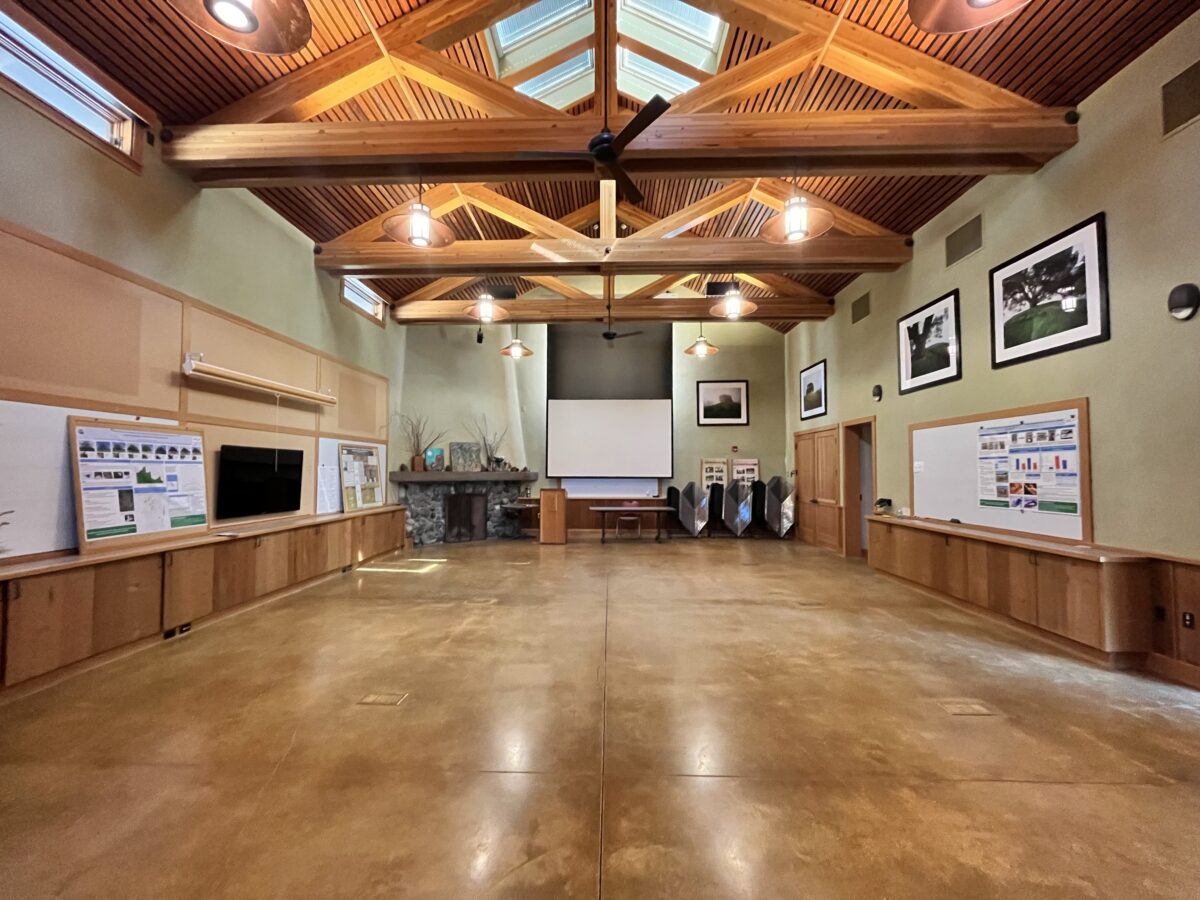
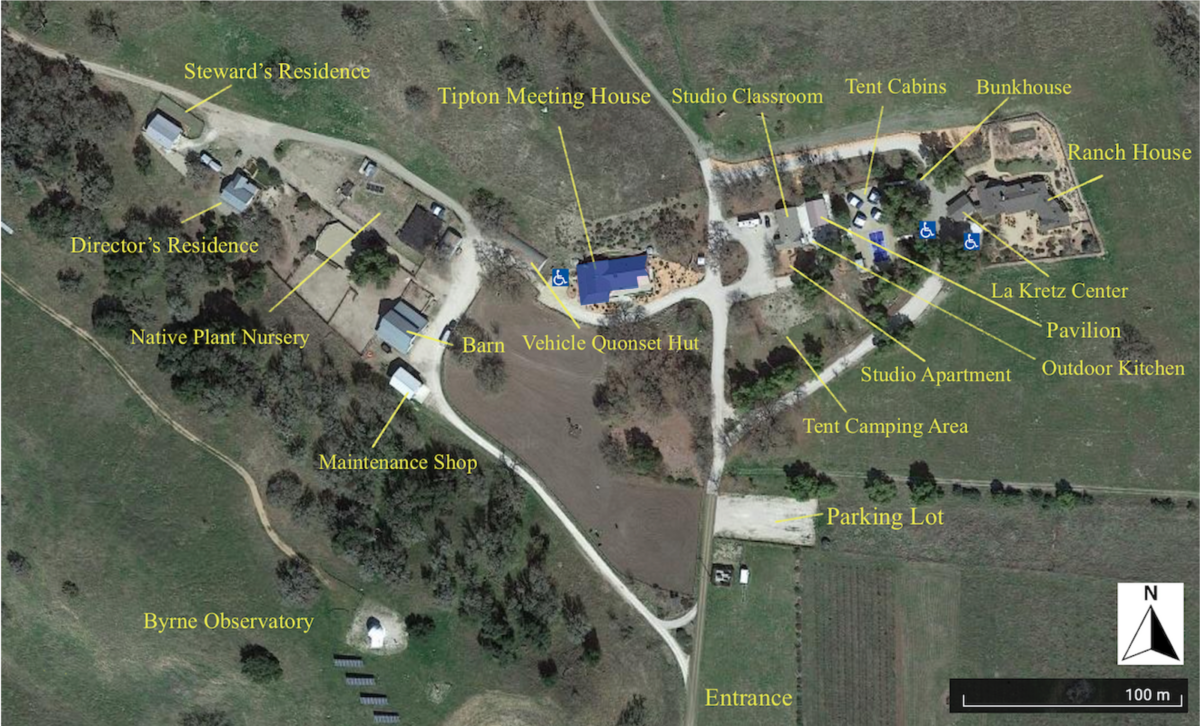
- The Tipton Meeting House is suitable for larger groups (up to 72), the Studio Classroom for medium groups (up to 20), and the Ranch House is suitable for small groups (up to 10). For a full list of facilities you can book go here.
- Please note that all hiking requires a docent, with the exception of the 2-mile self-guided Quail Trail. Please see here for more information about scheduling a docent-led hike.
- Recreational driving is not permitted. If you have a field component as part of your event, please indicate in the application.
- Availability-wise the summer is the best season to book your meeting or workshop. Spring and fall fill up quickly with research and class visits. Both of these take priority over meetings and workshops.
- Visitors looking to use Sedgwick Reserve for meetings are responsible for all event setup and cleanup. Failure to clean the used facilities will result in a cleaning fee.
- If you are unsure of whether your meeting is feasible and appropriate for a UCNRS site, review the NRS Use and Guidelines.
- Please reach out to us with your questions at nrs-sedgwick@ucsb.edu. If you have never been to Sedgwick Reserve, schedule a site-visit to view the facilities and have a tech demo sometime Monday-Saturday 8AM-5PM.
- Meals – we have kitchen facilities available to prepare you own meals. Please include the Tipton Kitchen if you need a refrigerator, coffee maker, tea kettle, stove, oven, dishwasher, etc. We have plates and cups for up to 50 people available.
- Catering – if you need catering, we work with Courtney Cardin, Personal Chef. She can be reached at court.petes@me.com (805) 235-6187.
The first step to using Sedgwick is to create an account in our Research Access Management System (RAMS). Be sure to record the user name and log-in password you used.
For new Projects, please email reserve staff to discuss nrs-sedgwick@ucsb.edu. Allow at least 10 business days (ideally more) for us to review your new Project.
Create a Project in RAMS. You will be asked to select the Project Type.
If the meeting is academic or research related select All Academic Meeting or Conference.
If your group is a non-academic nonprofit or community group, select Public Use.


1. Details – What information should I provide?
- Event Title – This can be general title if you want to make this an annual meeting
- Event Description – Describe your group and mission
2. Choose Your Team Members
- Include the person invoices should go to. Invoices can be paid via credit card or intra/er campus transfer.
- Include other key organizers.
- Search for the name of the person. If they are not in the system, choose Create a New User.
- You will need their name, email, phone number, emergency contact, institution name, and current address.
- This process is easier if your team member has an existing RAMS account.
Schedule a Visit
With over sixty five projects and dozens of classes running each year, coordination is essential to assure that everyone’s needs are met and conflicts with housing, equipment, vehicles and research sites are avoided. Your adherence to the online reservation process provides this essential research coordination.

1. Purpose of Visit
- Purpose of the meeting
- Any activities planned, including whether you will be at the field station or taking field trips off site
- Your anticipated need for meeting spaces and overnight housing
- Number of participants
- Contact information for a primary coordinator who will be on-site
- Whether your event has catering
2. Select Amenities
- Learn about facilities you can rent for your event.
- If you are not staying overnight, select Day Use.
- Select the time and date of arrival and departure.
- Enter the times and date for each amenity needed.
- If you need staff assistance, please choose what type of assistance you need and number of hours.
- Any groups visiting for an overnight must arrive M-Sa 8 AM – 5 PM to receive an orientation from a staff person. To coordinate an appointment email nrs-sedgwick@ucsb.edu.
3. Visitors
- Every individual must be listed on the Visit reservation.
- Easily add team members listed on your Project to the visitors list.
- Add Individuals by name using the search query. If an individual is in the system, their emergency contact information should be available.
- Create a New Team Member.
- You will need their name, email, phone number, emergency contact, institution name, and current address.
- This process is easier if your team member has an existing RAMS account.
- Add Group. If you don’t have their names, you can add groups of similar users, such as undergraduates. *See Waivers step 5.
4. Reserve-Specific Questions
- Make sure to include your cell phone number so we can reach you onsite.
- Indicate whether you will be using a drone and if you have submitted a flight request https://uassafety.ucmerced.edu/form/temporary-uas-flight-request.
5. Waivers
- Click on Digital Waiver and sign the waiver for yourself.
- Send the link to the waiver to everyone in your group.
- You are responsible for making sure everyone in your group signs the waiver. No one is permitted at the reserve without a waiver signed within the past year.
Approvals in 3 business days
- Staff will review your reservation and notify you as to whether you have been approved. During the visit reservation process, staff are looking at accommodation availability, road and weather conditions, fire risk, personnel availability, and other activities on the reserve.
- Anyone visiting the reserve for the first time must make an appointment for a safety orientation and check in at the office M-F 8 AM – 5 PM. To coordinate an appointment email nrs-sedgwick@ucsb.edu.
- Part of our job is to help you conduct a successful meeting so let us know how we can help. However, beyond basic administrative support, we would bill you for our time. This would be discussed before billing.
Hours of Operation
Sedgwick Reserve operates on limited staff. Staff are generally available Monday-Saturday 8 AM – 5 PM. Event organizers needing assistance should schedule a time to meet with staff during these hours. Sundays and Holidays are closed to Reserve use.
Guidelines for Reserve Visitors:
- Groups that are using the overnight facilities must arrive during business hours (M-Sa 8AM-5PM) to meet with a staff person for an orientation.
- Event organizers are responsible for ensuring the safety and conduct of all participants under their direction. Please review our code of conduct and share our rules with all participants. Note there are no dogs allowed.
- The address is 3566 Brinkerhoff Ave, Santa Ynez, CA 93460.
- Drive slowly on Brinkerhoff (<35 mph) and very slowly past the reserve gates (<15 mph). The speed limit on the reserve is 15 mph maximum to avoid road kill.
- Bring the gate code (given to you once your reservation is approved) as there is no cell phone reception at the main gate! DO NOT share this code with others.
- Stop by Tipton (big blue roofed building) every time you visit, and sign in and sign out using the computer kiosk in the lobby.
- Let reserve staff know if you plan to drive into the reserve beyond the field station. Recreational driving is not permitted.
- Charge and carry a cell phone.
- Let reserve staff know if you see anything broken or unusual out in the Reserve.
- Groups are expected to clean the used facilities before departing the reserve. Failure to leave a clean camp may result in a cleaning fee being sent to the home institution.
- Invoices will be emailed to the indicated person on the application after your visit. Let us know if you used different facilities than were on your RAMS reservation.
- Tag us in social media on Instagram and Facebook
- Share pictures with us that we can use for our written outreach materials. We’d love to feature your event in a post or article!